A private study recorder for Mac
Study normally.
Then read the record.
FocusProof is a private study tracker for macOS, not just a timer. Start the session you mean to study, work on screen or on paper, and finish with an inspectable account of where the time actually went — kept on your Mac.
For macOS 15 or later · Apple silicon and Intel
FocusProof is distributed independently and is not notarized by Apple. macOS requires manual approval the first time you open it. Read the seven-step install guide.
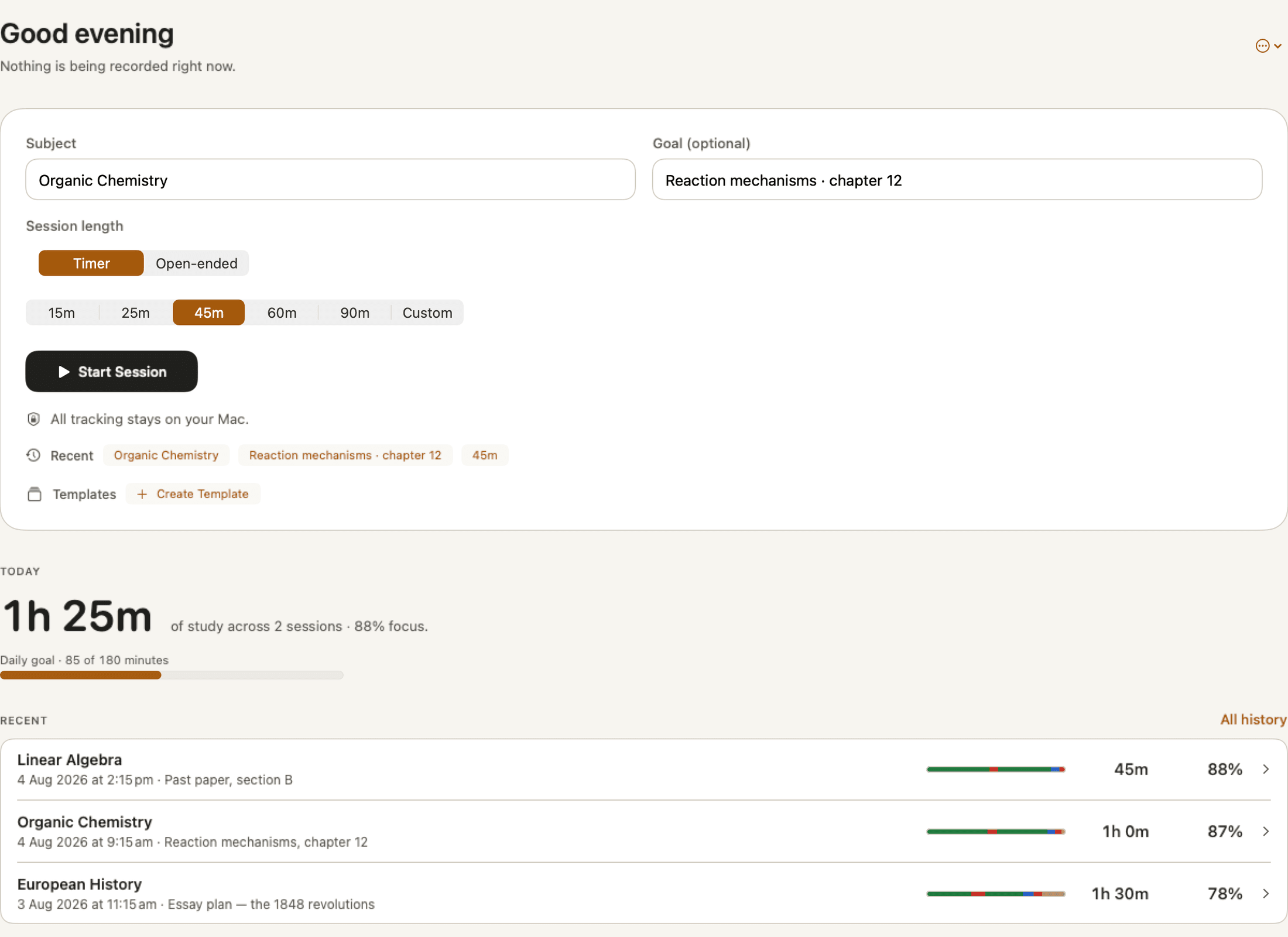
Focused Distracted Neutral Studying away from Mac
One session, start to finish.
Nothing runs in the background waiting for you to be productive. You decide when a session begins, and that decision is the only thing that turns recording on.
- Step 1
Say what you are studying.
A subject, and a goal if it helps — Reaction mechanisms, chapter 12. Recent subjects and saved templates are one tap away, so the setup takes seconds rather than becoming its own procrastination.
- Step 2
Choose a Timer, or leave it open-ended.
15, 25, 45, 60 or 90 minutes, a custom length, or no end at all when you do not know how long the work will take.
- Step 3
Study the way you actually study.
On the Mac, or away from it. Pause when you take a break. Tell FocusProof when you have moved to paper, and tell it when you are back.
- Step 4
Finish, and read what happened.
Study Time first, because it answers the real question. The evidence it was drawn from sits underneath, in as much detail as you want.
While you work, it stays out of the way.
An active session is one screen: what you are studying, how long is left, and what you are on right now. No streaks, no leaderboards, no interruptions to tell you how you are doing.
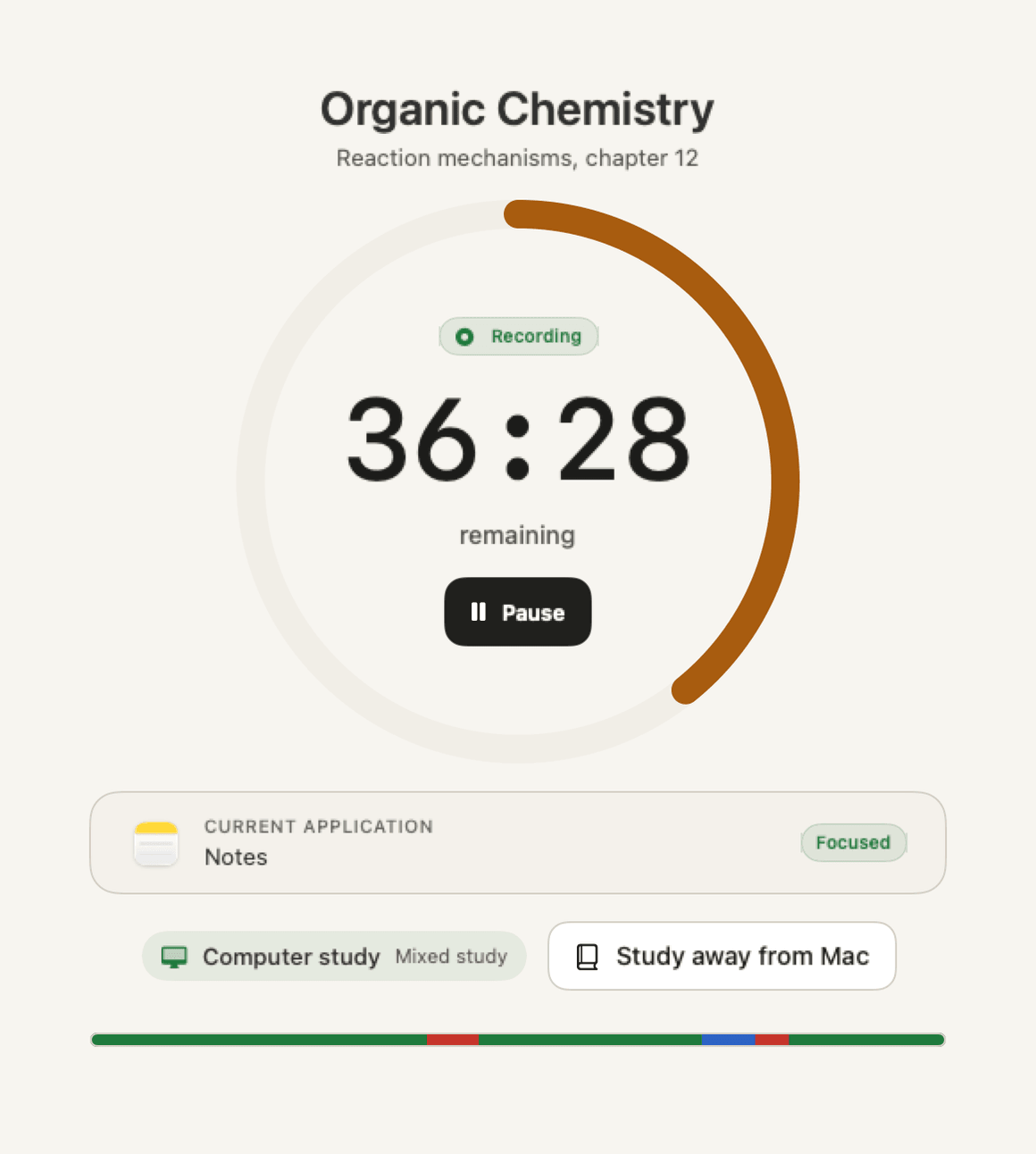
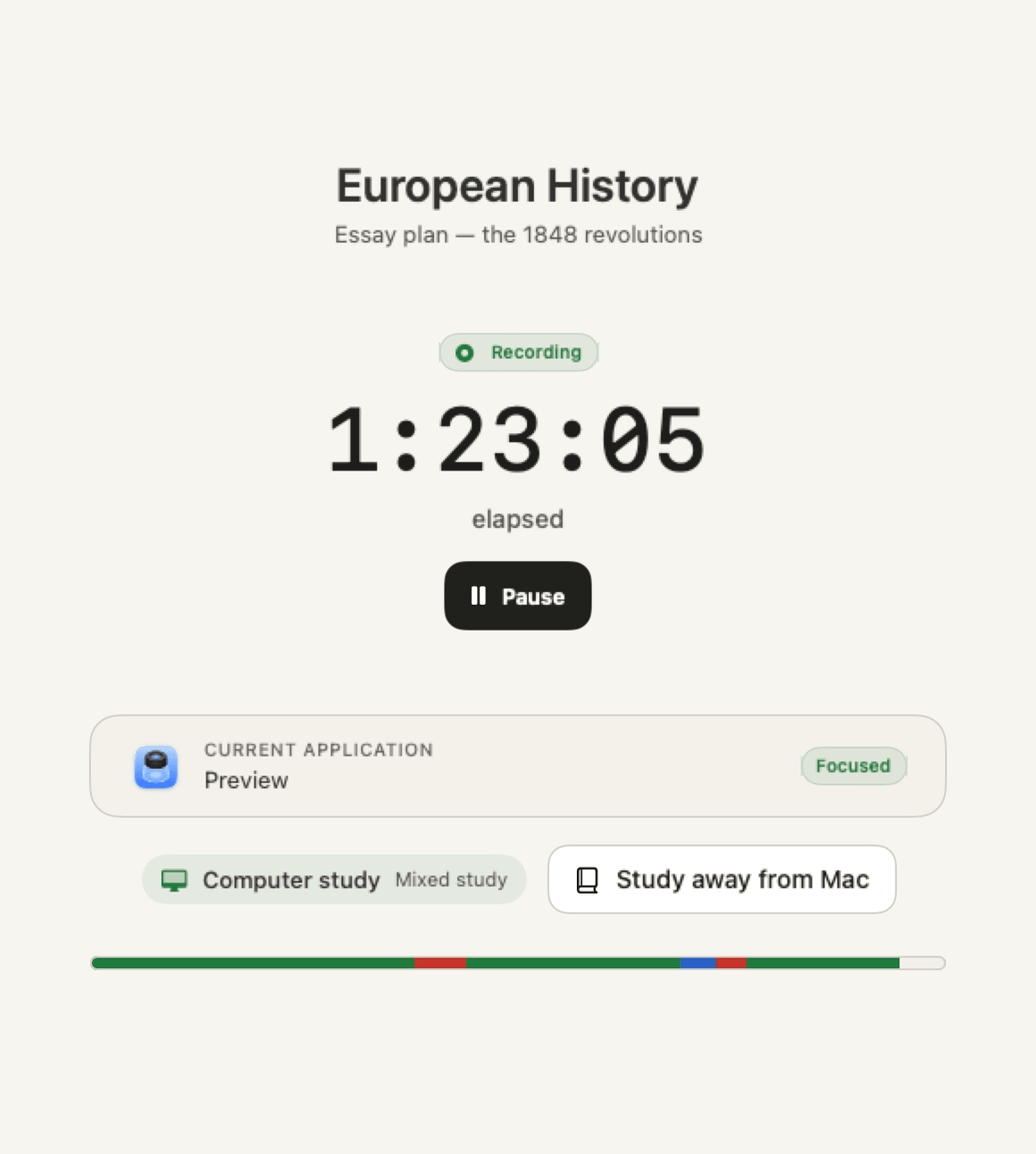
- Pause and resume Paused time is not recorded and does not count towards the session.
- Current application Shown as you go, with the classification it is being counted under — so nothing in the review is a surprise.
- Recording, visibly A Recording badge is on screen the whole time a session is running, and only while one is.
A quiet keyboard is not evidence of anything.
Plenty of real studying happens away from a screen — a textbook, a problem set, handwritten notes. FocusProof will not quietly credit that time to you, and it will not quietly hold it against you either.
When you move to paper, you say so. That time is recorded as confirmed away study and counts towards your Study Time. If you do not confirm it, it stays unresolved rather than being counted as focus you did not demonstrate. That distinction is the whole point: the record is only worth reading if it is honest about what it does not know.
In the app Study away from Mac → the session keeps running → Back to Computer Study when you return.
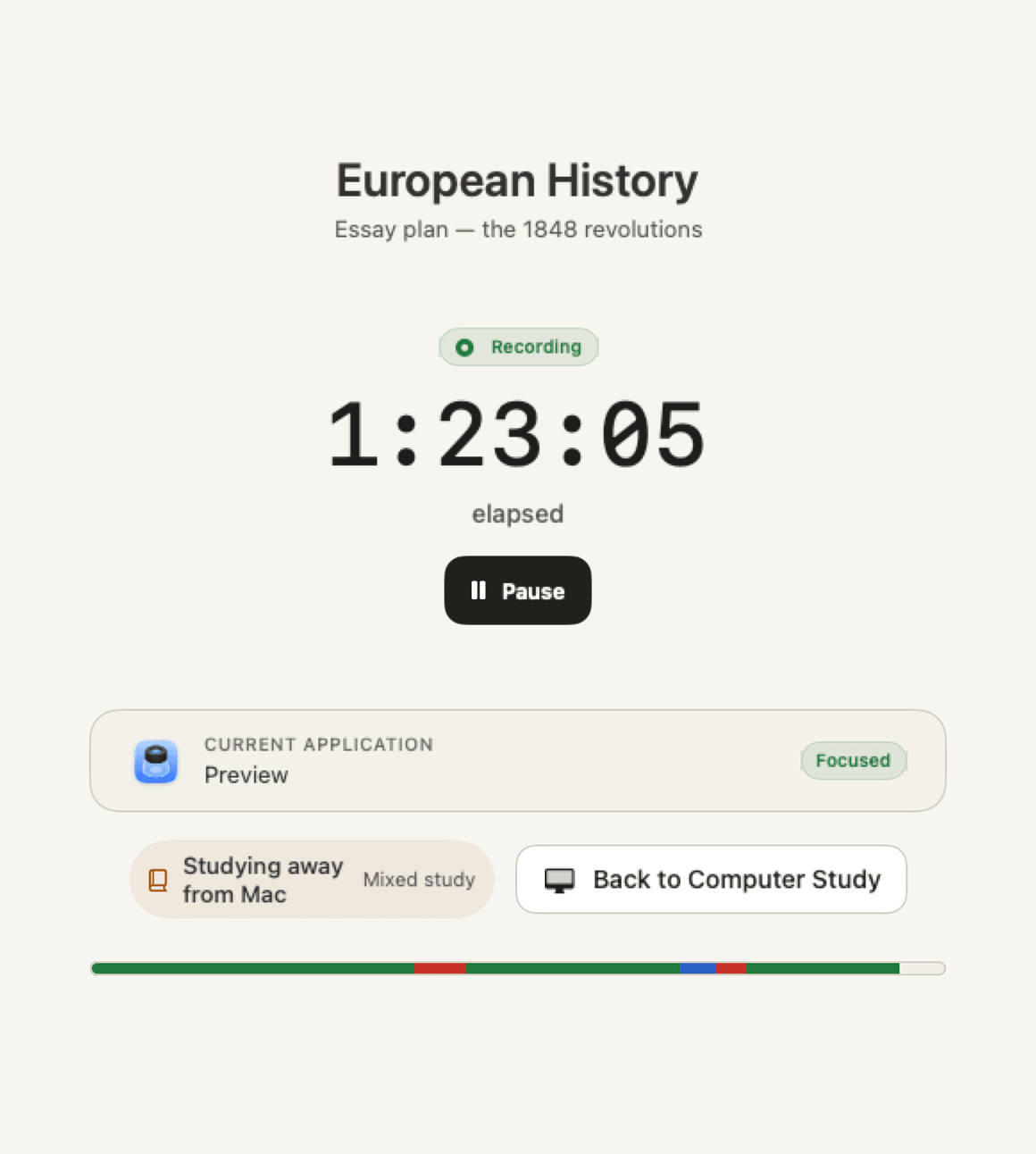
Then the session stops being a timer.
The moment you finish, FocusProof stops measuring and starts accounting. Study Time is the headline. The focus score sits beside it, as context rather than a grade.
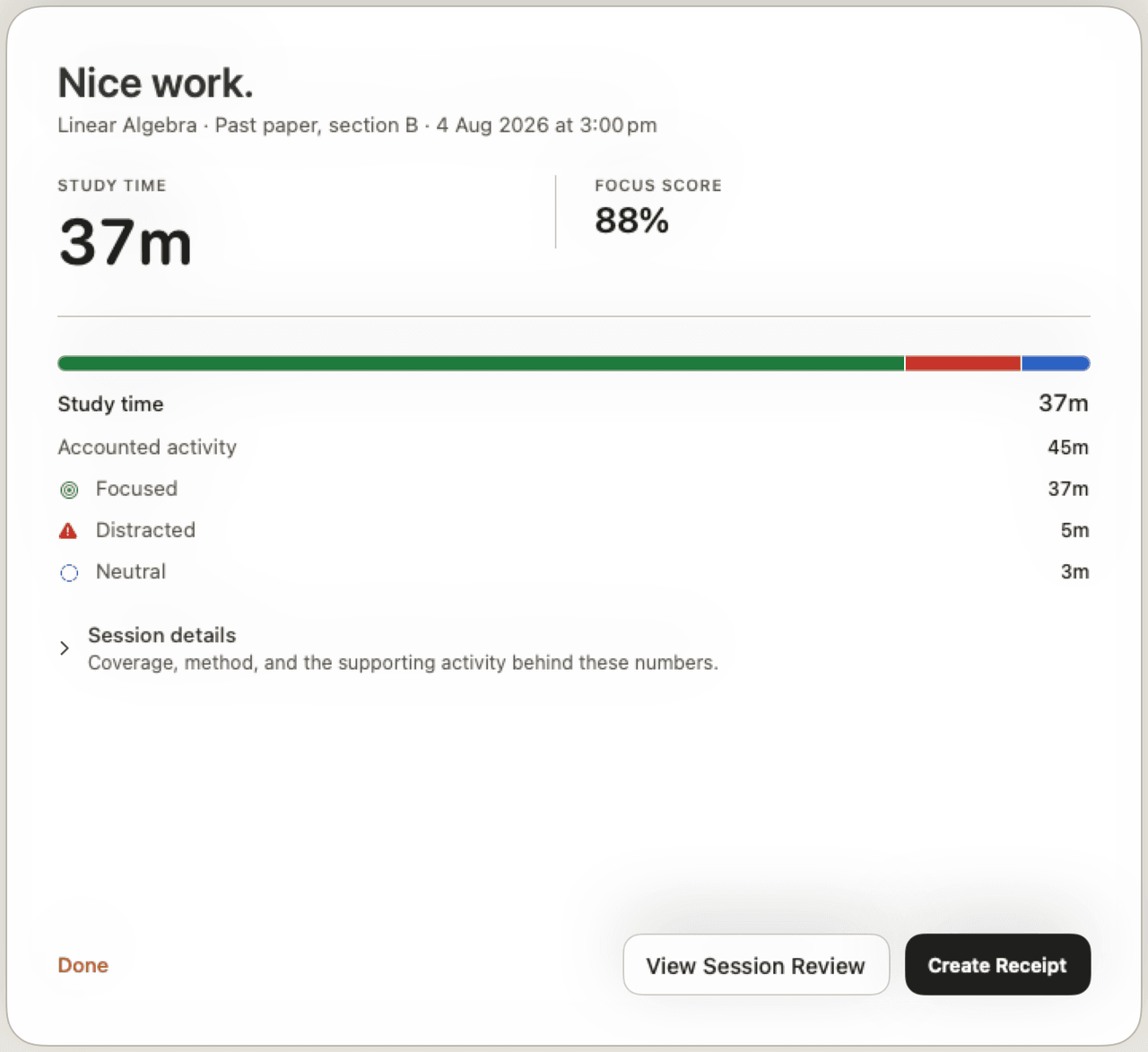
Every minute, accounted for once.
Session Review is where FocusProof earns its name. It shows the numbers, then shows its working: the timeline in order, the activity behind each stretch, and how much of the session the score could actually judge.
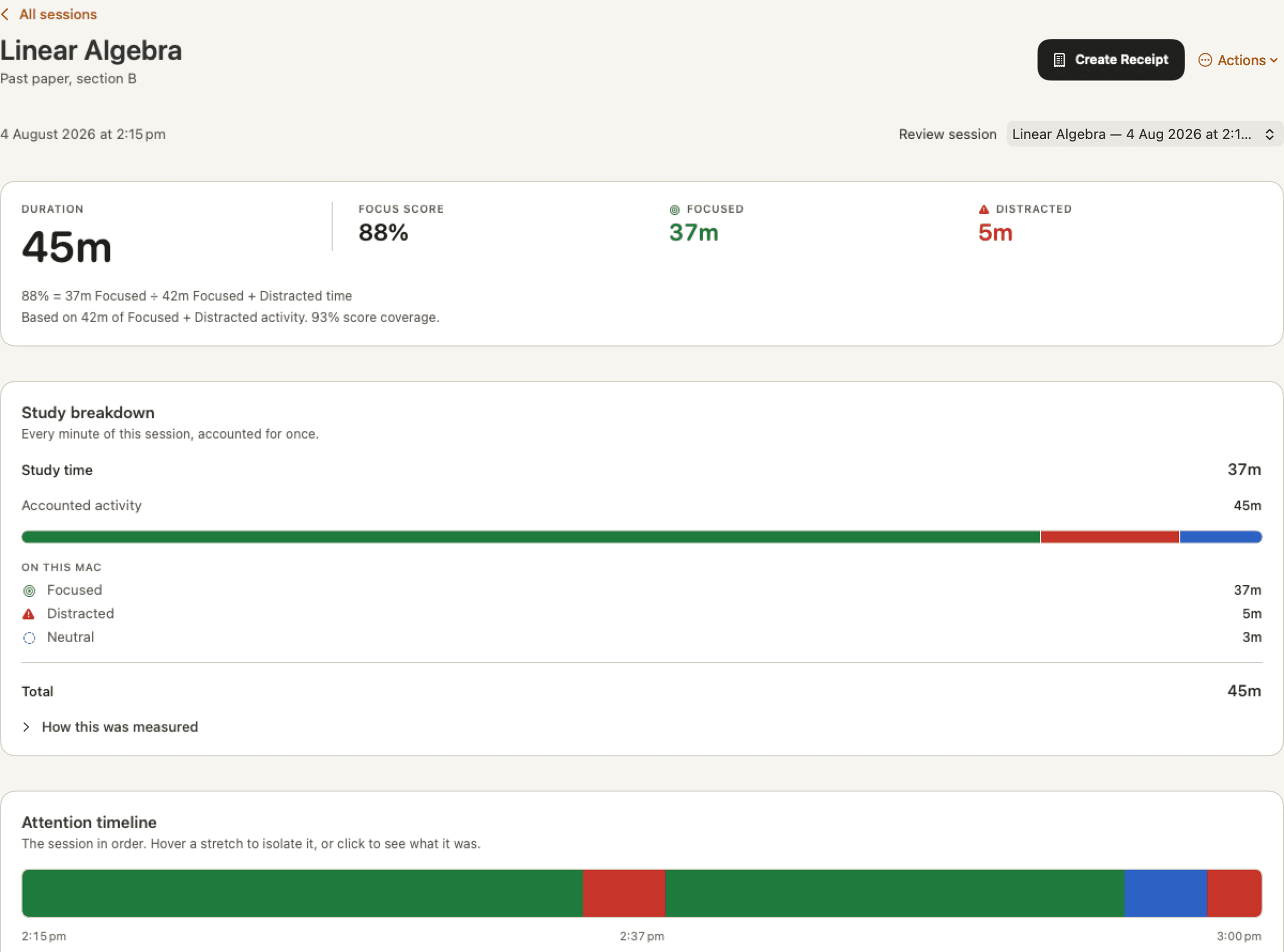
The four numbers, in plain terms
- Study Time
- Focused activity on your Mac, plus any time you confirmed as studying away from it. The headline result.
- Accounted activity
- Everything the session is made of: Focused, Distracted, Neutral, unclassified, and confirmed away study. It adds up to the session.
- Focus Score
- Focused ÷ (Focused + Distracted). A comparison between two kinds of on-screen activity — not a measure of attention, comprehension or how well you studied.
- Score Coverage
- How much of the accounted activity the score was able to judge. Under 50%, the score is still shown and marked Low coverage, so you can weigh it accordingly.
A score needs at least 60 seconds of Focused and Distracted evidence before FocusProof will show one at all. Below that, there is nothing honest to say.
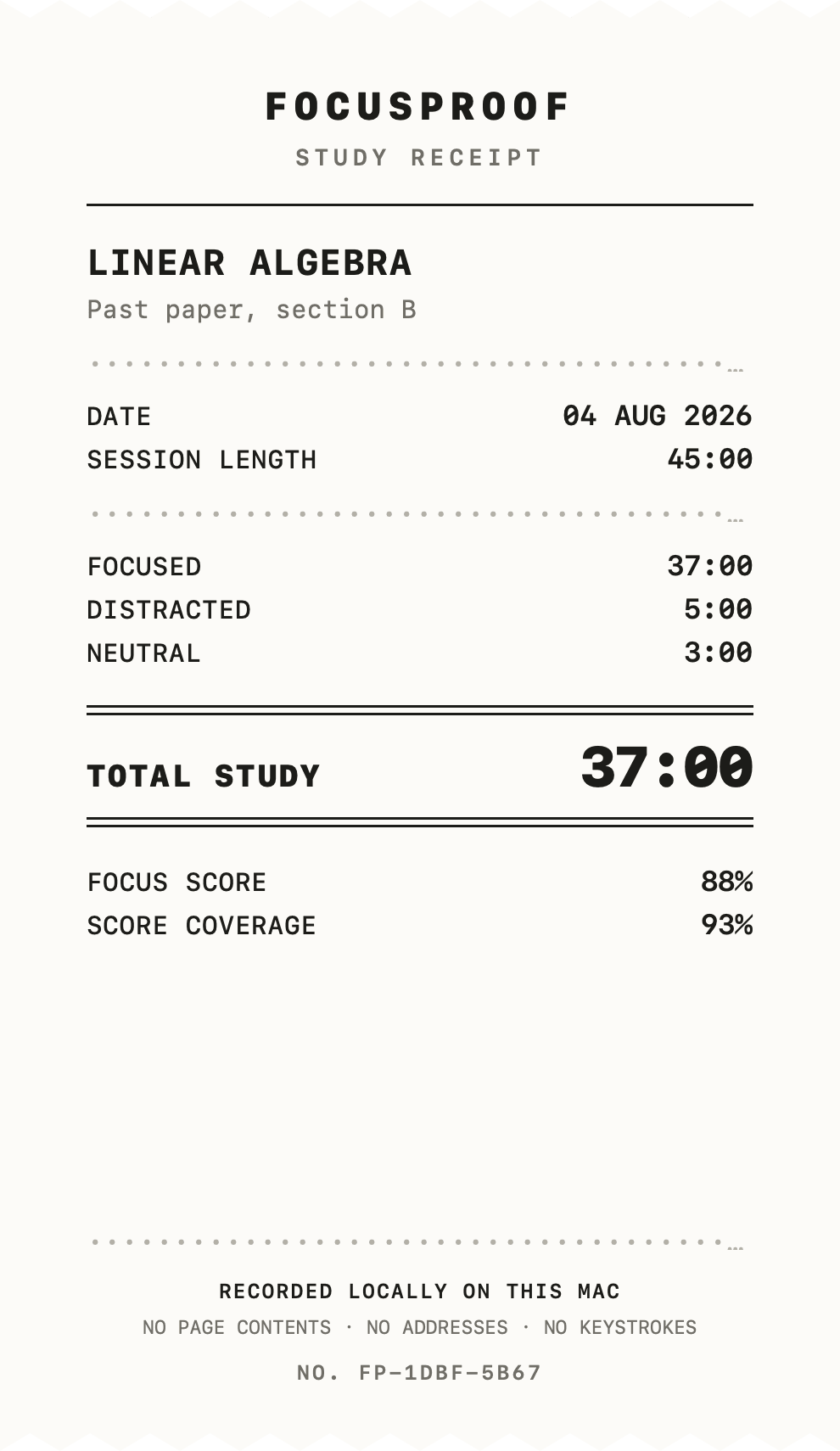
A session, printed.
The Study Receipt is a single sheet: subject, goal, date, session length, where the minutes went, and the total. It is generated on your Mac from the same figures Session Review used — the same 37:00, the same 88%, the same 93% coverage.
- Optional Made when you ask for one. No session produces a receipt on its own.
- Local Rendered on your Mac and saved where you choose, as an image or a PDF.
- Restrained Times, totals and a reference number. No app names, no domains, no addresses, no keystrokes.
- Yours Proof to yourself, or something you deliberately share. Not certified evidence, and not verification for anyone else.
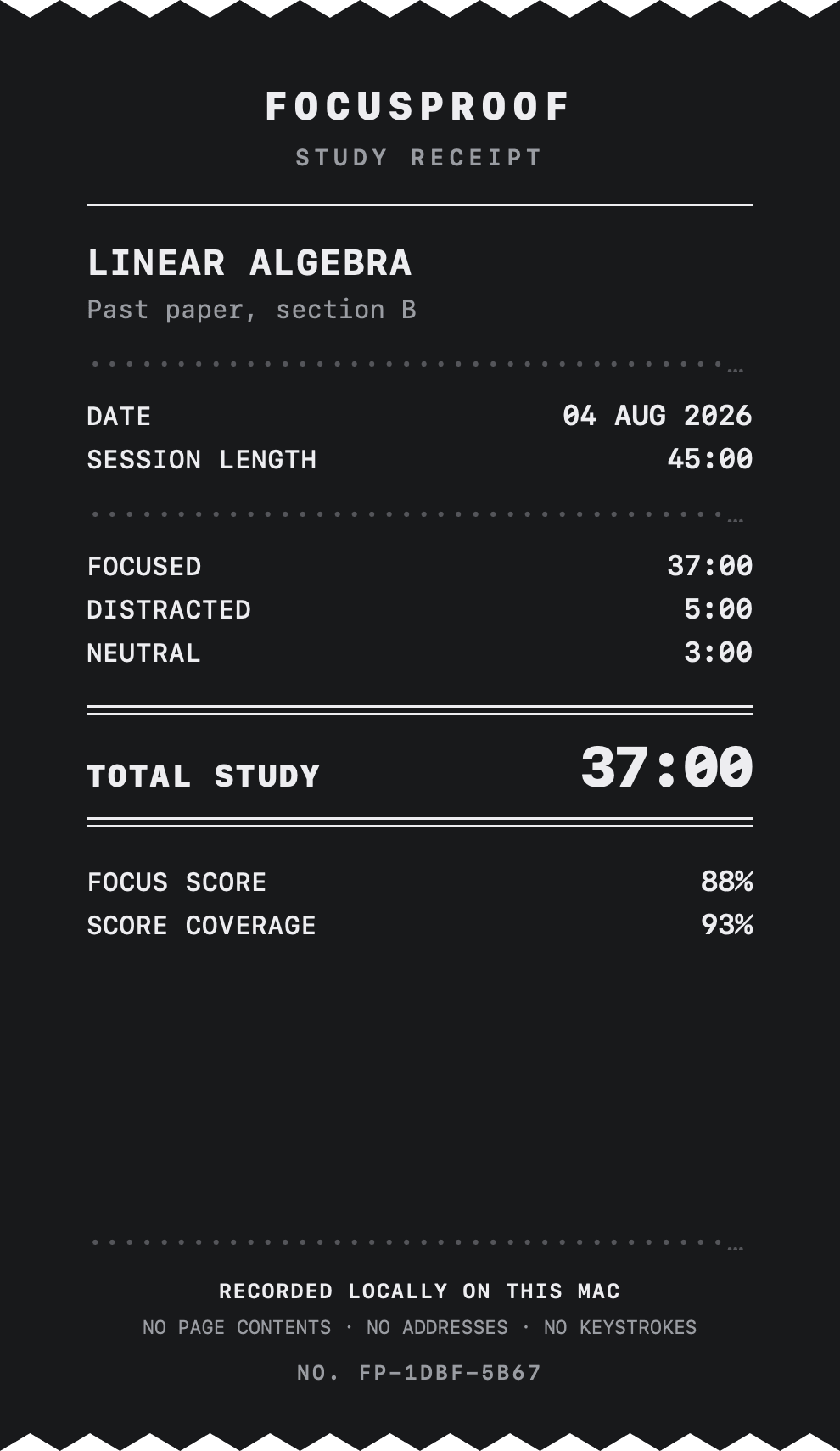
Both themes are rendered by the app. The paper sheet is the default.
One session is a record. A term is a pattern.
Every session stays in History, searchable by subject and goal. Insights reads across a week and tells you what it can see — not what you should do about it.
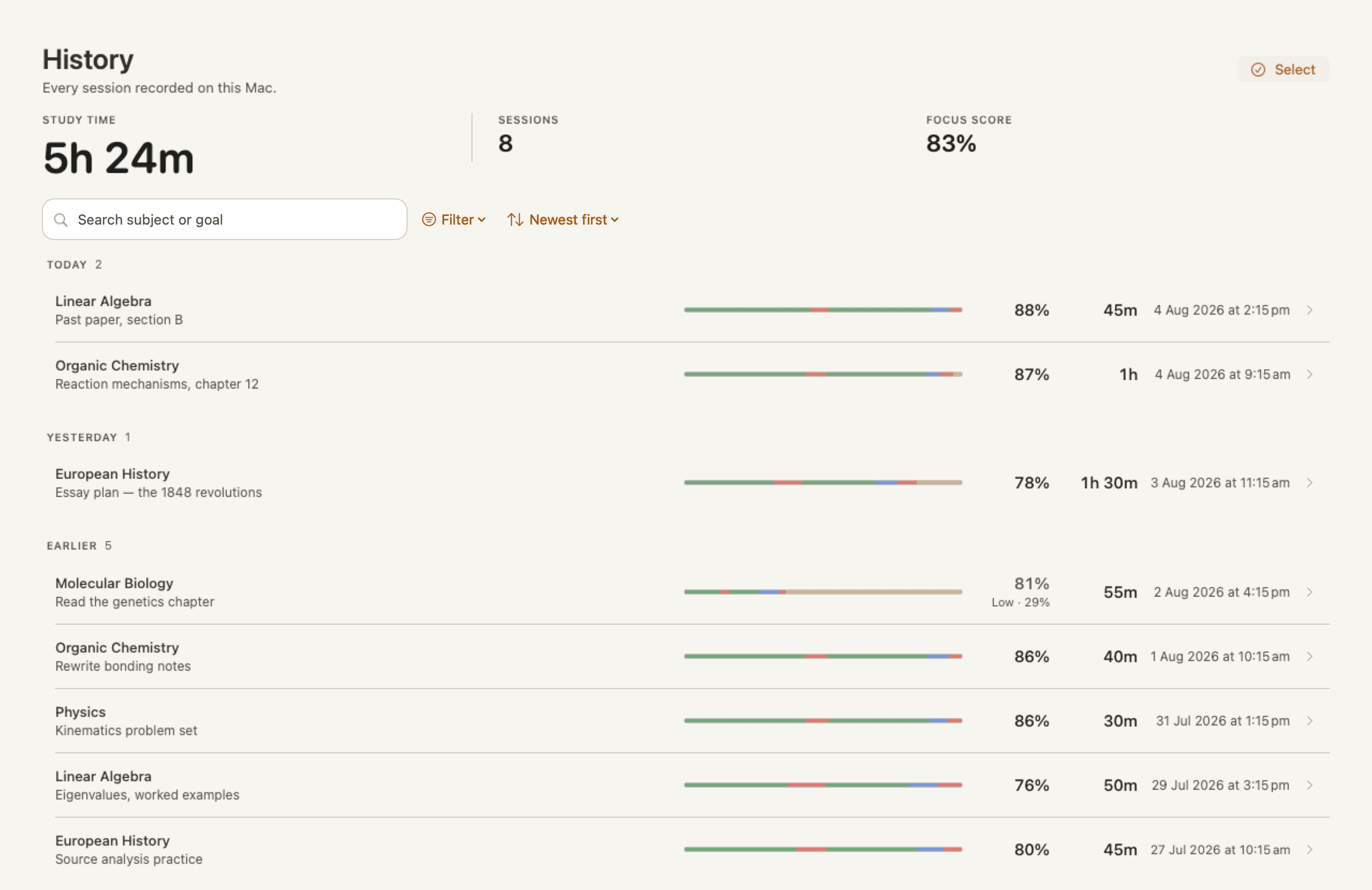
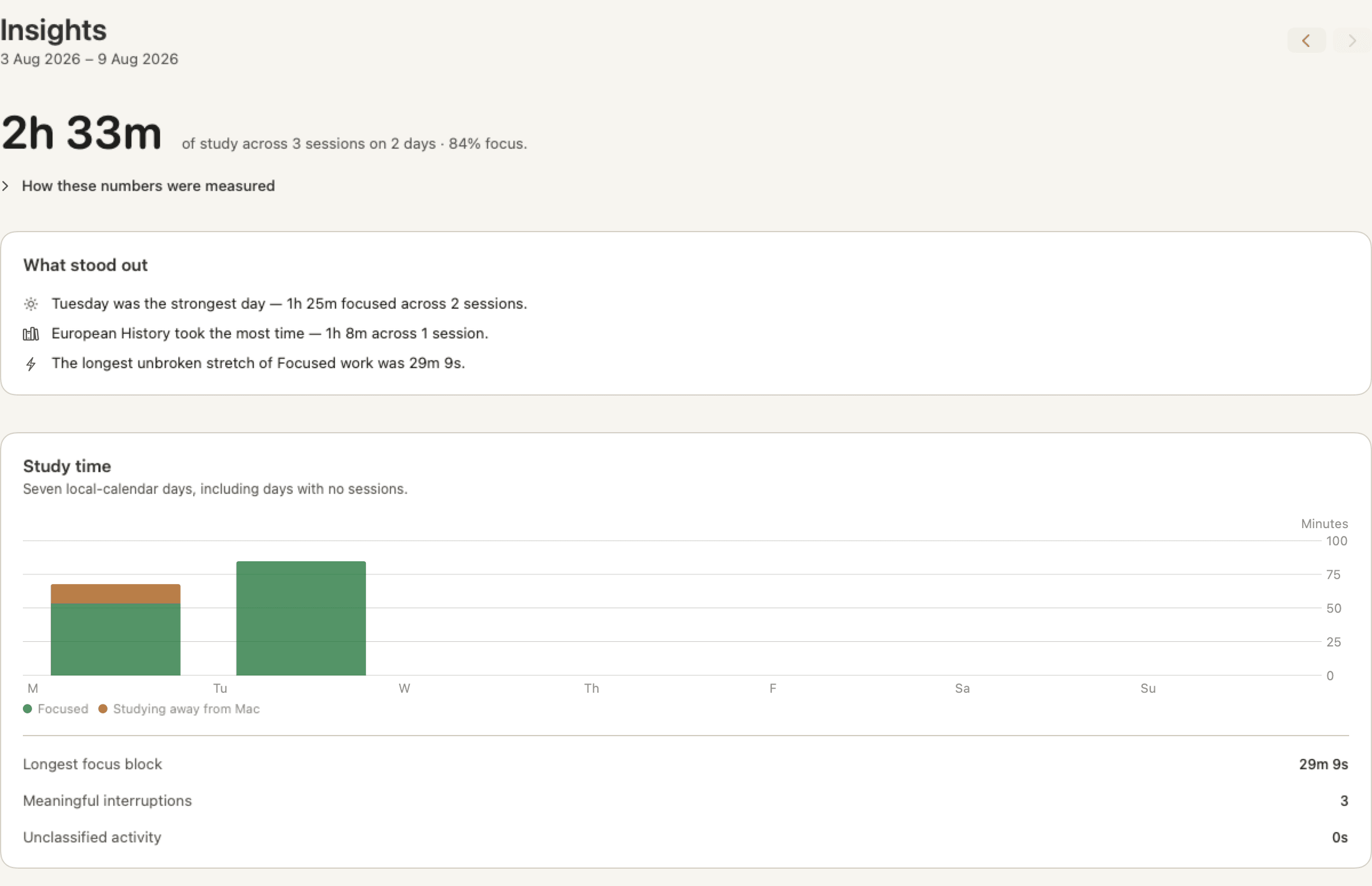
There is no coaching, no scoring of you as a student, and no promise that the numbers will go up. It is a record you keep, and reading it is the point.
The boundary is narrow, and it is drawn in the app.
FocusProof needs surprisingly little to build a useful record. What it does not need, it does not collect — so there is nothing to leak, export by accident, or explain away later.
During a session, it records
- The application you are using
- The website you are on, by name only, with Chrome set up
- When each activity started, and for how long
- Periods with no input, and periods it is unsure about
- Time you confirmed as studying away from your Mac
- How you classified that activity
It never records
- What you type, click or search for
- Page contents, full web addresses or file paths
- Screenshots or your clipboard
- Private messages
- Camera, microphone or location
- Anything at all outside a running session
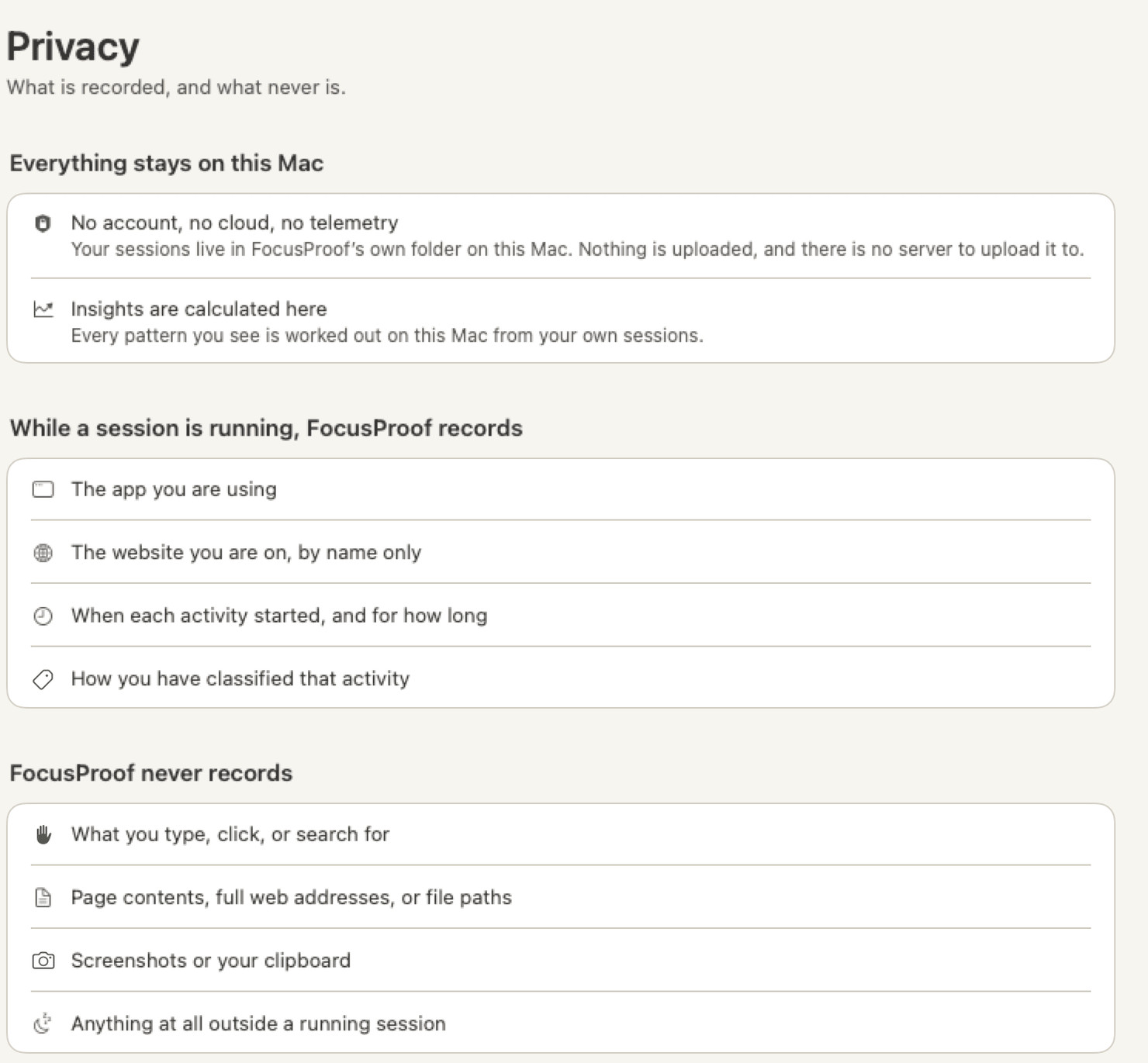
Your study data stays on your Mac unless you choose to export or share it. There is no account to create and no FocusProof server for sessions to go to. Read the full privacy page.
What you need.
- macOS 15 or later
- A native Mac application, universal for Apple silicon and Intel. There is no iPhone, iPad or web version.
- No account
- Nothing to sign up for, nothing to log in to. Open the app and start a session.
- Google Chrome — optional
- With the Chrome integration set up, time in Chrome is recorded by site name rather than as “Google Chrome”. Everything else works without it. Safari has no equivalent integration, so Safari time is recorded as the browser application.
- Manual approval on first open
- FocusProof is distributed independently and is not notarized by Apple. macOS requires manual approval the first time you open it. It is a one-time step, and the guide walks through it.
What does FocusProof record?
While a session is running: the app you are using, the website you are on by name only when Chrome integration is set up, when each activity started and how long it lasted, periods with no input, any time you confirm as studying away from your Mac, and how you have classified that activity.
Does it read page contents or what I type?
No. FocusProof does not need what you type, click or search for; page contents; full web addresses or file paths; screenshots; your clipboard; or your messages. Those are not collected, so they are not stored and not exported.
Does it run all day?
No. Recording starts when you start a session and stops when you finish or pause it. Outside a session FocusProof records nothing — the Today screen says so plainly: “Nothing is being recorded right now.”
What happens when I study from a book?
Choose Study away from Mac before you turn to the page. That time is recorded as confirmed away study and counts towards your Study Time. FocusProof does not assume that a quiet keyboard means you were reading — if you do not confirm it, the time stays unresolved rather than being counted as study.
What is Study Time?
Focused activity on your Mac plus any time you confirmed as studying away from it. It is the headline number, because it is the one that answers “how much did I actually do?”
What is Focus Score?
Focused ÷ (Focused + Distracted), shown as a percentage. It compares two kinds of on-screen activity and nothing else — Neutral, unclassified and away time stay out of it. It is context for a session, not a verdict on how well you studied.
What does “Low coverage” mean?
Score Coverage is how much of a session’s accounted activity the Focus Score was actually able to judge — (Focused + Distracted) ÷ Accounted Activity. When that is under 50%, FocusProof still shows the score but labels it Low coverage, so you know it was drawn from a small slice of the session. A score needs at least 60 seconds of Focused + Distracted evidence before it appears at all.
Does FocusProof block websites?
No. There is no blocker, no allowlist and no enforcement. FocusProof records what happened and shows it to you afterwards; what you do during the session is yours to decide.
Is my data uploaded anywhere?
Your study data stays on your Mac unless you choose to export or share it. There is no account and no FocusProof server to send sessions to. The app does contact the update feed to check for a new version, and exports and Study Receipts are files you create and control.
Does it work without Chrome?
Yes. Application-level recording is the core of FocusProof and needs nothing installed. The Chrome integration adds one thing: while you are in Chrome, the site you are on can be recorded by domain name instead of just “Google Chrome”. Safari does not have an equivalent integration, so Safari time is recorded as the browser application.
What does a Study Receipt prove?
It is a personal summary of one session, generated on your Mac from the same figures the app calculated. Treat it as proof to yourself, or as something you choose to share — not as verified or certified evidence for anyone else.
Which version of macOS do I need?
macOS 15 or later. FocusProof is a native Mac application and runs on both Apple silicon and Intel Macs. There is no iPhone, iPad or web version.
Why does macOS ask me to approve the app manually?
FocusProof is distributed independently and is not notarized by Apple, so the first time you open it macOS asks you to confirm. You approve it once, in System Settings → Privacy & Security, and it opens normally after that. The full seven steps are here.
How do I install it?
Download the disk image, drag FocusProof into your Applications folder, then approve it once on first open. The download page walks through every step, including what the approval screen looks like.
Start one session. Read the record.
FocusProof 1.0.1 is a free, independent Mac app. It records only while you say so, and what it records stays with you.
For macOS 15 or later · Apple silicon and Intel
FocusProof is distributed independently and is not notarized by Apple. macOS requires manual approval the first time you open it.